
When the right domain is not enough
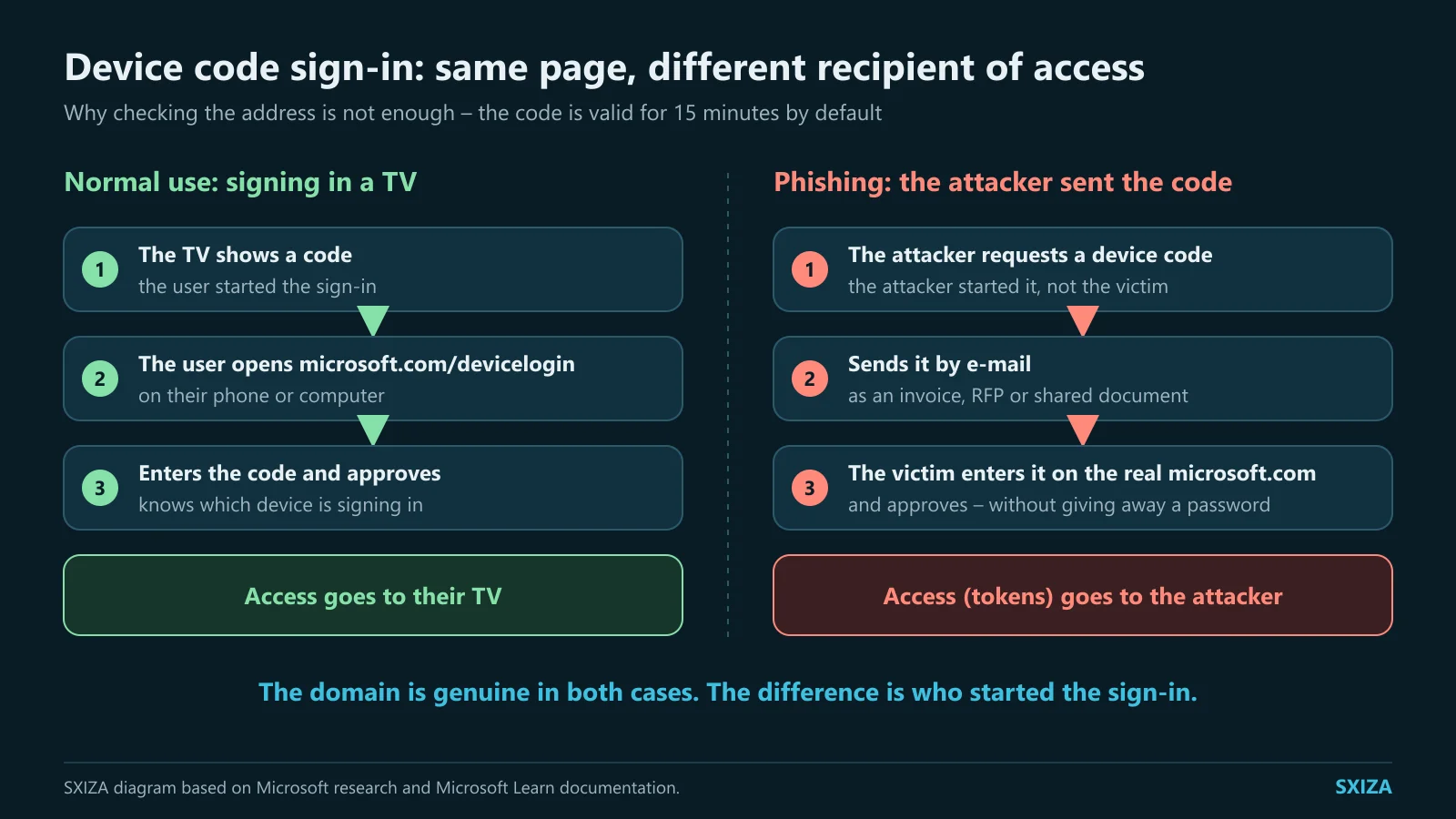
An email about an invoice, a request for proposal or a shared document can lead to the genuine microsoft.com/devicelogin page. Research Microsoft published on 6 April 2026 described device-code phishing: the attacker prepared a session and a victim entered its code at the official portal. By confirming it, the victim authorised the attacker session without disclosing a password. This is the research publication date, not a claim about the campaign start date. Source: Microsoft Security Blog
Device-code flow is a legitimate OAuth mechanism for devices with constrained input, such as a television or printer. The user opens a browser on another device, signs in, and the client polls for the result. Microsoft’s documentation says the default code lifetime is 15 minutes and that, on success, the client receives tokens for the requested permissions. Source: Microsoft Learn
This raises a specific question for staff training: can an employee distinguish a sign-in they initiated from a request sent by someone else? This is our recommendation for an exercise. The aim is to retain authentication controls while teaching people to check the purpose of a request before approving it.
Our analysis: verify the purpose of authorisation
“Check the address” is not wrong advice here; it is incomplete. A domain check verifies the site’s identity, not who created the session now awaiting authorisation or which application will receive access. Before entering a code from an unsolicited message, the useful question is: Which of my devices should receive access now, and for which specific application? If an employee cannot answer, they should stop and verify the request outside the delivered link.
For an organisation, it is more practical to decide where device-code flow is needed than to leave it as a silent universal setting. Keep a list of applications and devices that genuinely require it, the owner of every exception, requested permissions, and a review date. For other users, block or restrict the flow with Conditional Access; Microsoft recommends allowing it only where needed. Before enforcement, test policy impact in report-only mode and document narrow exceptions. Source: Microsoft Learn
Agree how an employee should report a suspicious request and who will answer when they are unsure whether to continue. In a hypothetical exercise, let support work only with the information normally supplied by a user. Observe whether they can identify the responsible team and hand over a clear record. Document missing contacts, authority or explanations. This observation can improve the procedure without judging training success only by the number of people who attended.
When suspicion arises, work from evidence for the specific session: user, time, application, IP address, scopes, and follow-on actions. Block or disable the compromised account in proportion to severity, revoke sessions and refresh tokens where the service supports it, and examine mailbox rules and application activity. Do not label a password reset as complete remediation: token lifetime and revocation depend on token type and the application. Microsoft Learn explains that a token and an application session may not end through the same action; the application administrator may need to intervene. The aim is to stop misuse, determine scope, and only then restore access safely. Source: Microsoft Learn
Before enforcing policy, obtain a real list of devices using the flow and test both normal and emergency paths for each. The output should be a decision, not merely a technical setting: allow, replace with a newer method, or retire. That is how exceptions avoid becoming permanent, invisible risk.
For an approved exception, record an expiry date and a deputy for its owner. When the device is retired, include removal of the exception in the same workflow.
Sources
- Microsoft Security Blog: Inside an AI-enabled device code phishing campaign — 6 April 2026; checked 9 September 2026.
- Microsoft Learn: OAuth 2.0 device authorization grant — continuously updated documentation; checked 9 September 2026.
- Microsoft Learn: Conditional Access — authentication flows — continuously updated documentation; checked 9 September 2026.
- Microsoft Learn: Revoke user access in an emergency — continuously updated documentation; checked 9 September 2026.